
Architecture
Overview
The ZCAM SDK allows an integrating app to:
- Take a picture
- Generate and sign a valid C2PA manifest over the photo including bindings of a signature of a photo using an Apple attested key and associated attestation.
- Generate a verifiable SP1 proof that the photo signature is valid, was signed using a key bound to the app, and corresponds to the photo, attaching that to a valid C2PA manifest
The core flow uses cryptographic keys stored on the device's Secure Enclave to sign and attest that a photo was taken using the device's camera and has not been tampered with.
Cryptographic Keys
The ZCAM architecture generates and leverages two keys:
| Key | Purpose | Apple Attested |
|---|---|---|
| Device Key | Signs over a hash of the photo | Yes |
| Content Key | Signs the C2PA manifest | No |
Both keys live in the Secure Enclave of the iPhone device. Importantly, the device key is specifically attested to have been generated on the Secure Enclave and is scoped to the specific app.
Photo Lifecycle
A photo progresses through three states to become a verifiable authentic photo:
| State | C2PA Assertion | Description |
|---|---|---|
| Raw | None | Original photo taken by phone, including metadata. No verifiable, attested traits. |
| Verifiable | succinct.bindings | Embeds a C2PA manifest including a signature using an Apple attested key over the photo and a verifiable attestation from Apple of the signing key. These can also be used as inputs to generate a zero knowledge proof |
| Proven | succinct.proof | Embeds a C2PA manifest including a verifiable zero knowledge proof that the photo was signed using a valid Apple attested key. |
Raw Photo → [Capture] → Verifiable Photo → [Prove] → Proven photo
(bindings) (proof)Flow
1. Initialization
The SDK first gets initialized. The main logic here is to generate or load the two necessary keys (device key and content key).
2. Capture
The capture step allows a user to take a photo and output a provable photo.
When a user wants to take a photo, the SDK opens the camera screen. After the photo is taken, the SDK embeds a valid C2PA manifest by doing the following:
- The photo is hashed, then signed using the device key. This outputs an Apple Attest assertion including a signature over the hash.
- The C2PA manifest is initialized with a capture action including metadata: time of photo, OS, device model, software version, etc.
- A
succinct.bindingsassertion is added to the manifest including data necessary to prove that the photo was signed using a valid Apple attested key.
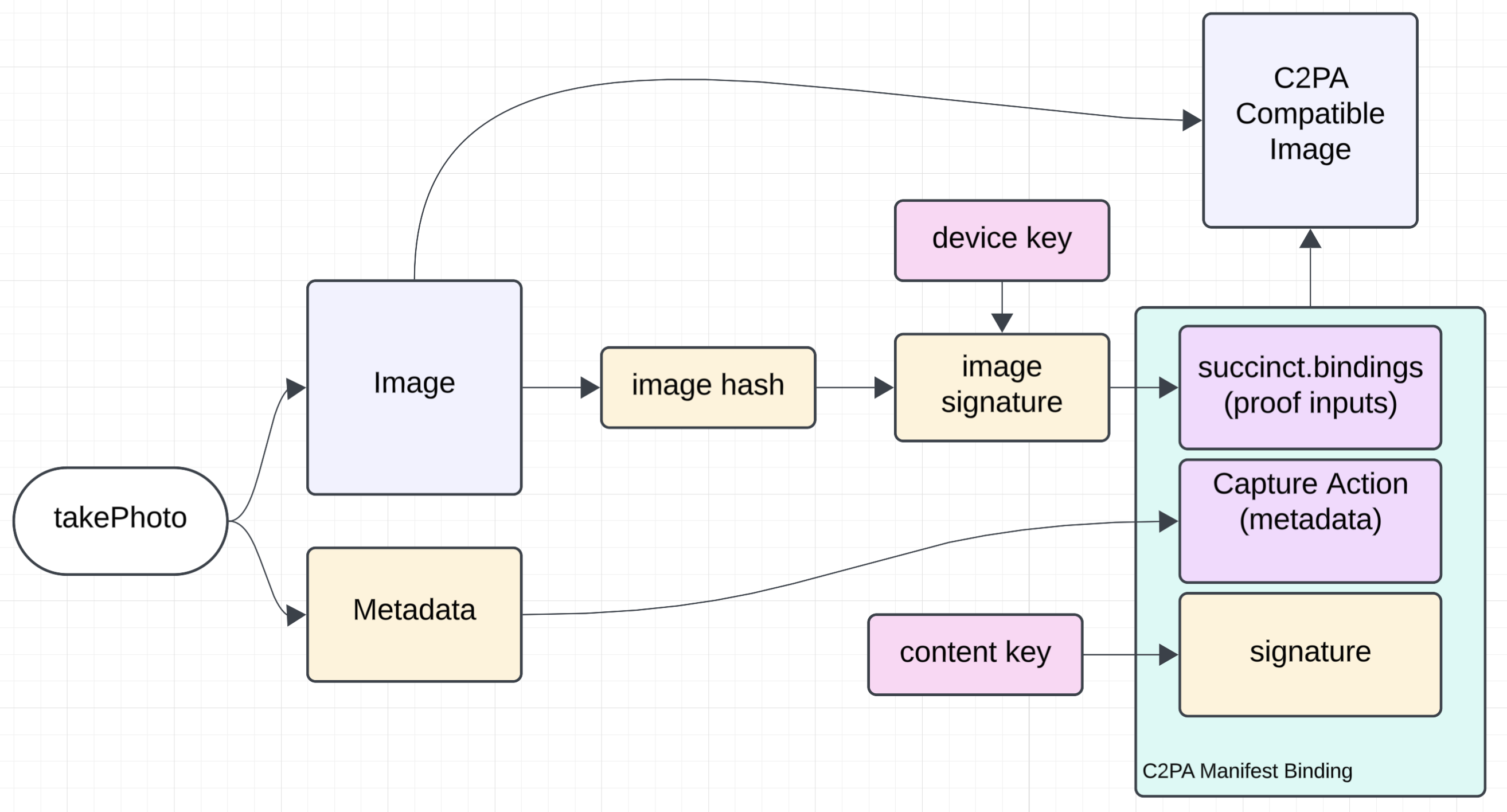
Output: A verifiable photo with a valid C2PA manifest containing metadata and an assertion that the photo was signed with an Apple attested key.
3. Prove
The prove step takes the provable photo with C2PA manifest including a succinct.bindings assertion and generates a proof verifying its validity. This is done by using the SP1 Prover Network to prove the ZCAM program with the photo (and C2PA manifest) as input.
The SDK receives the proof from the network, then updates the photo and C2PA manifest:
- The
succinct.bindingsassertion is removed - A
succinct.proofassertion is added containing the verifiable proof
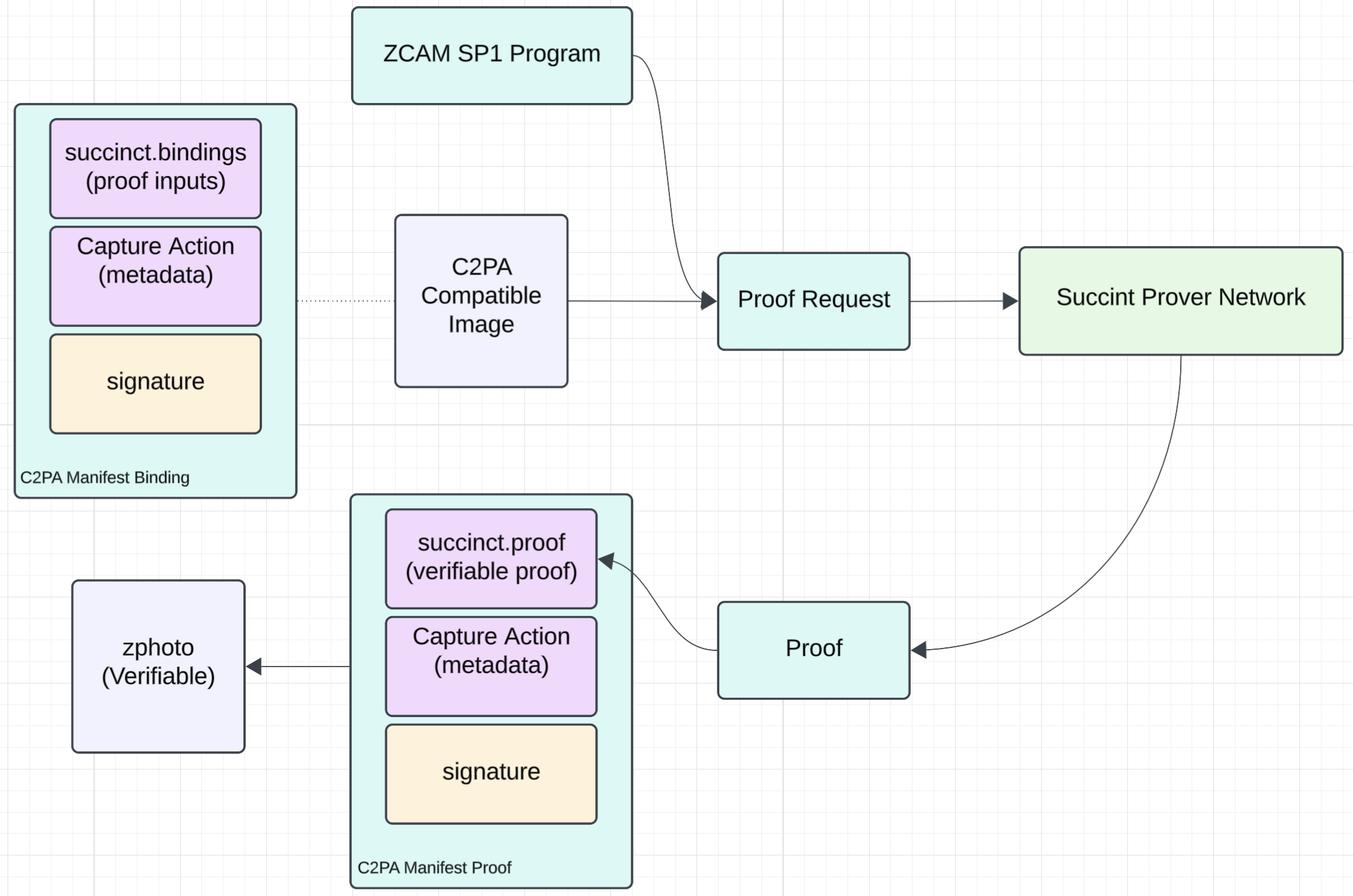
Output: The final verifiable photo with a valid C2PA manifest including a verifiable proof.
4. Verify
The SDK includes logic for parsing and verifying the proof from the C2PA manifest:
- Extract the manifest from the photo
- Verify the proof in the manifest
- Verify the photo hash matches the manifest